Description
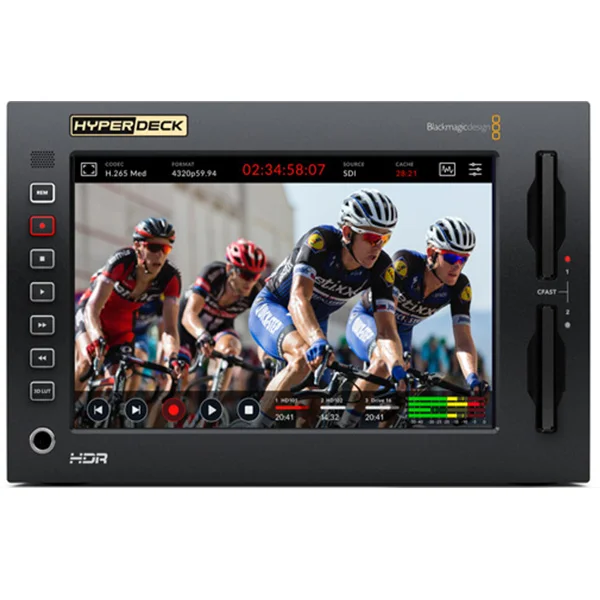
The Blackmagic HyperDeck Extreme 8K HDR recorder combines HyperDeck reliability with the latest innovations. It offers H.265 recording, an optional internal cache, 3D LUTs, and support for native 8K and HDR. By recording native 8K in H.265, you reduce storage costs while ensuring stunning image quality. The large LCD screen provides optimal visibility of your recordings and settings controls. You can now transform it into a traditional broadcast recorder simply by adding an HyperDeck Extreme Control. The HyperDeck Extreme meets the demands of next-generation broadcasts, live productions, and digital signage!
#image_1252051156 {
width: 100%;
}
Traditional controls in a modern design
The HyperDeck Extreme features an innovative touchscreen interface with recorder controls and a large screen for viewing your recordings. Simply add a HyperDeck Extreme Control to transform it into a traditional broadcast recorder, complete with a large, uniquely tactile shuttle wheel! You can even rack-mount the controller and HyperDeck. The HyperDeck Extreme includes two storage bays, Quad 12G-SDI technology, analog connections for archiving, a USB-C port for recording to an external drive, and a front-panel speaker and headphone jack. It also includes an optional cover to eliminate dropped frames if your media is full or slow. AC and DC power connections are included for use in the studio or in the field.
#image_245938000 {
width: 100%;
}
Ideal for live production, digital signage and archiving
The HyperDeck Extreme is incredibly versatile, making it ideal for live production. You can use it as a main recorder, clip player, or to record independent feeds. Analog inputs allow you to record from tapes, so you can adapt your older programs for streaming platforms or editing. Displaying your content in 8K is easy with the HyperDeck Extreme, as it supports 10G Ethernet and offers a very simple remote control protocol. You can even use it in the field, as it’s equipped with HDMI, SDI, and analog inputs, as well as built-in scopes and 3D LUTs. The scopes will be invaluable for ensuring broadcast-standard compliance before streaming and broadcasting.
Convert your old programs for streaming
With streaming services becoming increasingly popular, it’s important to preserve your cultural diversity by maintaining localized content. We offer an affordable solution for adapting your older programs to streaming platforms. The HyperDeck Extreme Control allows you to connect older recorders, set an in and out point, and then edit. Simply connect the HyperDeck Extreme 8K and the HyperDeck Extreme Control to each recorder for continuous archiving with a single operator. You can even work with multiple formats using the Teranex Express to convert SD tapes to HD in a single step. You can control a wide range of recorders, such as Digital Betacam, older 1-inch C-format tape recorders, and Betacam SP.
Recording and playback in full 8K resolution
The latest 12G-SDI Quad Link technology is included, allowing you to record and play back your content in full 8K resolution. Since SDI connections are multi-rate, you can use the 12G-SDI Quad Link to communicate with other 8K products, or you can switch between SD, HD, and Ultra HD and use only a single 12G-SDI connection. The HyperDeck Extreme supports H.265 for high-resolution 8K recording and playback, enabling you to record and play back 8K content on standard CFast cards. The HyperDeck Extreme 8K is therefore ideal for connecting to the latest generation of 8K TVs and projectors. It also pairs perfectly with ATEM switchers. With the upcoming Tokyo Olympics being broadcast in 8K, the format of the future is already here!
A large, bright, touchscreen display
The innovative touchscreen LCD gives you incredible control. It displays play, stop, and record buttons, as well as a mini timeline for navigating your recordings. You can even swipe the screen to search for frames individually. At the top of the screen, you’ll find information on timecode, video standard, recording media status, and VU meters. You can activate scopes, as well as focus and exposure assist, by touching the screen. The LCD menus also offer numerous other settings and controls. In addition, you can load and save 3D LUTs. You have dedicated buttons for transport control, activating the 3D LUT, and remote control. To take advantage of traditional broadcast controls, simply add an HyperDeck Extreme Control.
#image_776947936 {
width: 100%;
}
Traditional broadcast recorder controls
The HyperDeck Extreme Control expands the capabilities of your HyperDeck Extreme by adding traditional broadcast recorder controls. This gives you a familiar, traditional broadcast recorder design. You can control up to eight recorders via RS-422 control. You can even rack-mount it with the HyperDeck Extreme to create a single « broadcast recorder. » Because it uses the RS-422 standard, you can control legacy broadcast recorders and edit using in and out points, which is ideal for archiving your content. You can even edit footage with multiple frame rates. The traditional controls were designed in-house by Blackmagic Design to ensure superior ergonomics and tactile feedback.
Two CFast slots for endless recording
CFast card slots allow you to record to widely available flash memory cards. H.265 files are small enough to be stored on standard CFast cards. Furthermore, since the camera includes two CFast card slots, you can swap full cards, even during recording, for virtually unlimited recording. CFast cards are particularly well-suited to the broadcast industry because they are small, fast, and affordable. You can even use a Blackmagic MultiDock 10G for SSD compatibility. In H.265, it’s possible to record 498 minutes in 8Kp60 on a 1TB card, 1059 minutes in Ultra HD 2160p60, and 2354 minutes in 1080p59.94 on a 1TB card. That’s over 8 hours of 8K video and over 39 hours in HD!
Record directly to external USB-C drives
To record to other types of media, you can use the USB-C expansion port to connect external flash drives. USB-C flash drives offer immense storage capacity, as they have no size limit. Furthermore, since you can record to the same drive you use for editing, you don’t waste time copying files before post-production. Flash drives are so fast that you can record formats with data rates too high for CFast cards, such as real-time ProRes 8K. By adding the Blackmagic MultiDock 10G, you can use SSDs for compatibility with other HyperDeck models. Finally, you can manage external drives from the touchscreen.
Optional caching to prevent image loss
Your storage media might be full before it’s replaced, or your card might be too slow. This can lead to dropped frames. To avoid this problem, you can install a PCIe flash drive on the HyperDeck Extreme 8K to cache your recordings. This eliminates dropped frame issues with CFast media or external drives because the cache will automatically save the content that couldn’t be recorded. Even if a card is full, recording will continue to the cache until you switch to a different medium. The cache even allows you to record formats that are too fast for cards or external drives. A thermal pad is included for installing standard PCIe flash drives.
HDMI, analog and advanced 12G-SDI Quad Link connectivity for 8K
The HyperDeck Extreme 8K features a wide range of video and audio connections, including multi-rate 12G-SDI Quad Link for SD, HD, Ultra HD, and 8K SDI devices. These 12G-SDI outputs support fill and key signals when playing back 4:4:4:4 RGBA files. HDMI is included for connecting to consumer TVs and video projectors. For archival work, the HyperDeck also offers balanced analog audio, HiFi, and timecode connections. It even includes a down-converted SDI output that displays information on-screen for monitoring. The USB-C connection allows you to connect flash drives or disc arrays for recording. The HyperDeck Extreme 8K also features a 10G Ethernet port for high-speed uploading using FTP protocols. It also includes AC and 12V DC XLR power connections.
Advanced HDR support and LCD screen offering a wide color gamut
You’ll be ready for HDR workflows thanks to its support for the latest HDR standards and its extremely bright display with a wide color gamut. The built-in scopes even switch to HDR scopes when working with HDR formats. Files are tagged with the appropriate HDR information, and the SDI and HDMI inputs automatically detect HDR video standards. PQ and HLG static metadata formats are processed according to the ST2084 standard. Because the bright LCD screen offers a wide color gamut, it can support Rec. 2020 and Rec. 709 color spaces. The HyperDeck Extreme 8K HDR’s display gamut can even fully support the DCI-P3 format.
Standard H.265 and ProRes files for broad compatibility
8K offers the same number of pixels as Ultra HD. Therefore, the HyperDeck Extreme 8K uses H.265 files for 8K recording to reduce costs and simplify 8K workflows. H.265 files are extremely small and have compression ratios ranging from 60:1 to 285:1. Furthermore, they are supported by most operating systems. You can use H.265 for all 8K, Ultra HD, and progressive HD formats. The HyperDeck Extreme 8K also supports ProRes 422 HQ, ProRes 422, and ProRes 422 LT formats for recording and playback, and ProRes 4444 for fill and key outputs. These files are compatible with software such as DaVinci Resolve, Media Composer, Premiere Pro, and Final Cut Pro X.
Professional multichannel SDI and analog audio
The HyperDeck Extreme 8K HDR features professional audio connectivity for modern broadcasts or for archiving content from older broadcast recorders. When working in SDI formats, you can record 2, 4, 8, or 16 channels of audio in real time. For capturing older broadcasts, the HyperDeck Extreme 8K HDR includes four XLR analog audio inputs that allow you to record four channels from Betacam SP VTRs. For monitoring, use the four on-screen VU meters and select VU or PPM ballistics. This unit also offers direct HiFi audio inputs for consumer equipment such as VHS VCRs, DVD players, and set-top boxes. In addition to its cutting-edge 8K technology, the HyperDeck Extreme 8K HDR also provides analog connections designed to meet broadcast specifications for low noise and low distortion.
Ultra-fast network connection thanks to the 10G Ethernet port
The HyperDeck Extreme 8K HDR is ideal for digital signage because it includes a super-fast 10G Ethernet port that allows for remote media . is even faster than transferring from a CFast card! All models use a simple text-based protocol, and you can use Telnet to test commands. Simply connect to the HyperDeck and type « Play » for playback or « Record » for recording. It couldn’t be easier! To load media files remotely, you can use FTP, or even FTP client software. When Ethernet and FTP are used with a large disk array, the HyperDeck Extreme becomes a highly efficient broadcast server for media management and playback.
Works with most popular video software
Because HyperDeck Extreme 8K files are widely supported, they are compatible with all operating systems and most video software. The media can be formatted in ExFAT or HFS+, so you can simply plug it into your computer to access the files, just like a standard hard drive. DaVinci Resolve is perfect for HyperDeck, as it offers editing, color grading, audio post-production, and visual effects tools all in one application. What’s more, you can download DaVinci Resolve for free for Mac, Windows, and Linux! It’s also possible to use the recorded files in other popular software, such as Premiere Pro and Final Cut Pro X. Since HyperDeck media is widely supported, your files will always be playable in the future.